


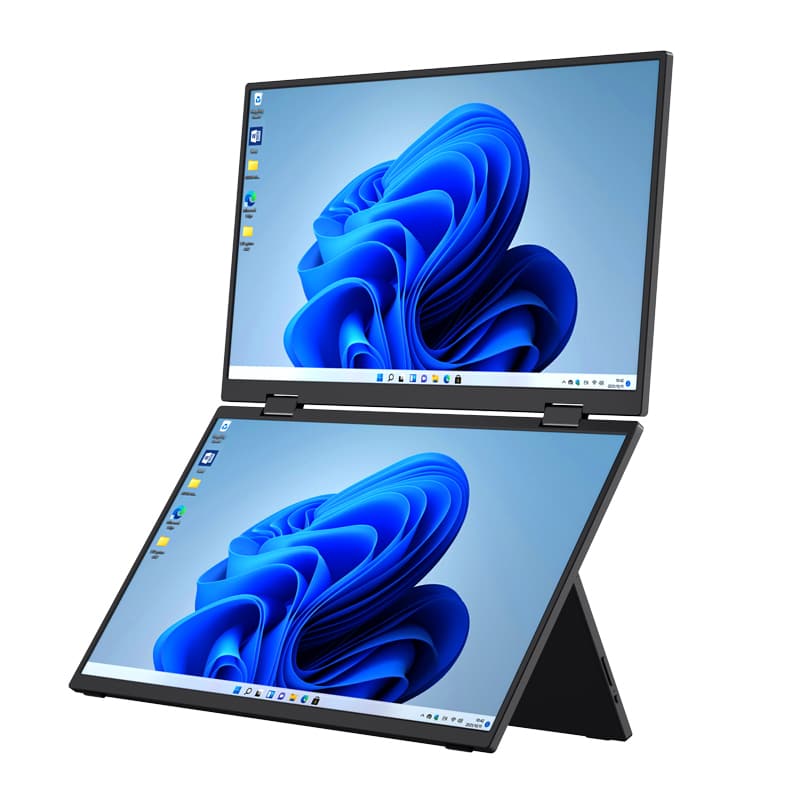
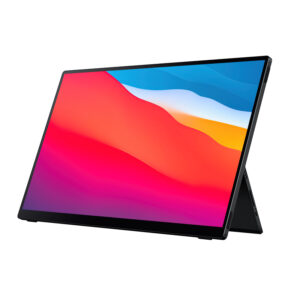
If you need more screen space while working away from your desk, a Portable Monitor for MacBook Pro can solve a common problem: balancing portability with a productive multi-screen setup. A single laptop display can become restrictive when you manage documents, code, design files, presentations, or communication at the same time. The 15.6-inch Dual-Screen Portable Monitor from Shenzhen Weichensi Technology Co., Ltd. gives you two additional 15.6-inch Full HD displays in a foldable format, creating a practical multi-screen workspace for business travel, remote work, and creative tasks.
Why Choose a Portable Monitor for MacBook Pro?
The key advantage of a dual-screen portable monitor is that you do not have to sacrifice screen space when you leave your office. Instead of carrying a conventional desktop monitor, you can use a compact folding display solution that expands your workspace when needed.
The Weichensi model features two 15.6-inch displays, each with a 1920 × 1080 Full HD resolution. The IPS panels provide wide viewing angles, while the 100% sRGB color gamut supports everyday creative and visual work.
Key specifications include:
- Dual 15.6-inch Full HD displays
- 1920 × 1080 resolution × 2
- IPS panel with wide viewing angle
- 100% sRGB color gamut
- 250–300 nits brightness, depending on model
- 60Hz refresh rate
- 16:9 aspect ratio
- 10-point capacitive touch, optional
- Flexible folding and free-angle adjustment
- USB single-cable connectivity
- Support for MacBook triple-screen extension
This combination makes the display suitable when you need a dual monitor for MacBook Pro without building a permanent workstation.
15.6 Inch Dual-Screen Portable Monitor for Different Workflows
A portable display becomes more useful when it matches the way you actually work. This dual-screen design supports several practical scenarios.
Remote Work and Business Travel
When you work from a hotel, coworking space, or temporary office, you can use the two displays for different tasks. For example, keep email or project management software on one screen while using the MacBook Pro display for documents and the second external screen for research.
The folding structure also makes transportation easier than carrying two separate monitors.
Programming and Professional Work
Developers often need a code editor, documentation, terminal, and testing environment visible at the same time. A MacBook Pro screen extender with two additional displays can reduce the need to constantly switch between windows.
You can dedicate one external screen to source code and another to browser testing, logs, or technical documentation.
Design and Content Creation
The 100% sRGB color gamut provides a useful foundation for photo editing, graphic design, and content creation workflows. The Full HD IPS displays also offer wide viewing angles, helping maintain consistent visibility when you change your viewing position.
For creators who travel frequently, this provides a practical alternative to carrying larger desktop displays.
Portable Monitor for MacBook Pro vs. Standard External Monitor
Before choosing a display, you should consider whether portability or permanent installation matters more.
| Feature | Dual-Screen Portable Monitor | Standard Desktop Monitor |
|---|---|---|
| Screen configuration | Two 15.6-inch screens | Usually one screen |
| Portability | Folding and travel-oriented | Designed for fixed use |
| Resolution | 1920 × 1080 per screen | Varies by model |
| Panel | IPS | Varies |
| Connectivity | USB single-cable design | Depends on model |
| MacBook workflow | Supports multi-screen extension | Usually requires separate setup |
| Touch option | 10-point capacitive touch | Depends on model |
| Best use | Travel, remote work, presentations | Office or permanent workstation |
If you frequently move between locations, a foldable portable monitor can provide a better balance between productivity and mobility.
How to Set Up a Dual Monitor for MacBook Pro
You can approach the setup in a few straightforward steps:
- Check your MacBook Pro configuration and available connectivity before purchasing.
- Connect the portable monitor using the supported USB connection and required accessories.
- Open the display settings on your MacBook Pro and configure the external screens.
- Choose extended or mirrored display modes according to your workflow.
- Adjust the folding angles to create a comfortable viewing position for both screens.
The device supports MacBook triple-screen extension, allowing you to build a broader workspace instead of relying only on the laptop’s built-in display.
Why Consider Weichensi as a Portable Monitor Manufacturer?
Shenzhen Weichensi Technology Co., Ltd. has 9 years of experience in portable, medical, and industrial monitor development and manufacturing. Its product range covers portable monitors, medical monitors, industrial monitors, industrial all-in-one machines, Android all-in-one machines, and advertising all-in-one machines.
The company states that it has obtained 20+ product certifications, holds 10+ authorized patents, and works with 100+ global partners. Its production system covers product design, solution development, manufacturing, assembly, and quality control.
For buyers evaluating a portable monitor manufacturer, these factors can help you assess more than the display specifications alone. Factory production capability, quality processes, technical development, and product certification are also relevant when considering OEM, ODM, or long-term supply requirements.
FAQ
1. Can this portable monitor extend a MacBook Pro screen?
Yes. The product is designed to support MacBook triple-screen extension, allowing the MacBook Pro and the two 15.6-inch external displays to form a multi-screen workspace.
2. What resolution does the dual-screen portable monitor use?
Each display provides 1920 × 1080 Full HD resolution. Both screens use IPS panels with a wide viewing angle.
3. Is touchscreen functionality available?
Yes. 10-point capacitive touch is available as an optional feature, making the monitor suitable for interactive work, browsing, presentations, and creative applications.
Conclusion
A Portable Monitor for MacBook Pro can give you the extra workspace you need without turning a mobile workstation into a bulky setup. With dual 15.6-inch Full HD IPS displays, 100% sRGB coverage, flexible folding, optional 10-point touch, and support for MacBook triple-screen extension, the Weichensi solution fits remote work, programming, design, presentations, and business travel. With 9 years of display industry experience, 20+ product certifications, 10+ authorized patents, and a broad product portfolio, Shenzhen Weichensi Technology Co., Ltd. can also support buyers evaluating portable display solutions for professional and commercial applications.

Add comment