


A small laptop screen can limit your productivity when you work with spreadsheets, design files, multiple applications, or detailed documents. A Touchscreen Portable Monitor gives you additional workspace while allowing you to interact directly with on-screen content. However, choosing the right model requires more than checking its display size. You should also consider resolution, refresh rate, touch responsiveness, color performance, and device compatibility.
The 18.5-inch portable monitor from Shenzhen Weichensi Technology Co., Ltd. combines a Full HD IPS display, 100Hz refresh rate, and 10-point capacitive touch functionality. Its slim design and multiple connectivity options make it suitable for mobile offices, creative workflows, presentations, and entertainment.
Why Choose an 18.5-Inch Touchscreen Portable Monitor?
Screen size directly affects how much content you can view without constantly switching between windows. An 18.5-inch display provides more working space than many smaller portable monitors, making it useful when you need to manage several tasks simultaneously.
The larger viewing area also supports different working environments, from temporary office setups to home workstations and business presentations.
10-Point Capacitive Touch for Direct Interaction
The monitor features 10-point capacitive touch, allowing you to interact with compatible applications through finger gestures. You can navigate interfaces, select objects, scroll through documents, and perform other touch-based operations without relying entirely on a mouse.
This functionality is particularly useful for:
- Business presentations: Navigate slides and interact with displayed content.
- Creative workflows: Make direct selections and adjustments in compatible software.
- Education and training: Support interactive demonstrations and learning activities.
- Office applications: Navigate documents, dashboards, and spreadsheets more conveniently.
Touch functionality requires a compatible connection and operating system. Check your device’s touch support and connection requirements before purchasing.
Full HD IPS Display with 100Hz Refresh Rate
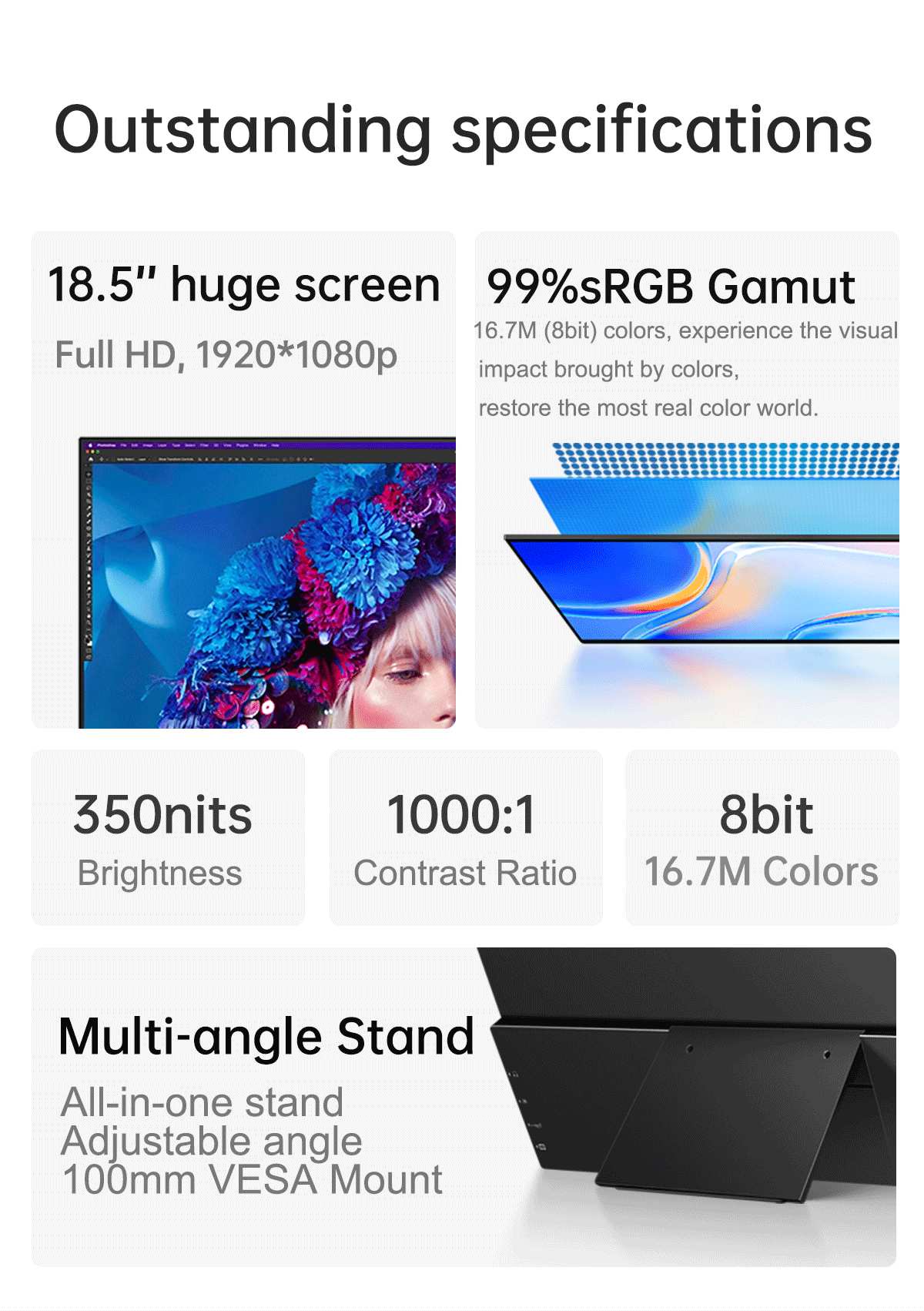
Display quality affects both everyday usability and viewing comfort. This model combines a 1920 × 1080 Full HD resolution with an IPS hard panel and a 97% sRGB color gamut.
These specifications support clear text, detailed images, and consistent colors across a wide viewing angle.
The 100Hz refresh rate also provides smoother motion than a standard 60Hz display. You can benefit from more fluid scrolling, responsive interface movement, and smoother video playback.
Depending on the model configuration, brightness ranges from 250 to 350 nits. This makes it important to consider your working environment, particularly if you plan to use the monitor in brightly lit spaces.
Key Specifications of the 18.5-Inch Portable Monitor
Before selecting a portable display, compare its specifications with your actual application requirements.
| Specification | Product Details |
|---|---|
| Display Size | 18.5 inches |
| Resolution | 1920 × 1080 (Full HD) |
| Panel Type | IPS hard screen |
| Refresh Rate | 100Hz |
| Color Gamut | 97% sRGB |
| Touch Function | 10-point capacitive touch |
| Brightness | 250–350 nits, depending on model |
| Aspect Ratio | 16:9 |
| Connectivity | USB-C (DP Alt Mode), HDMI, USB-A |
| Speakers | Built-in stereo speakers |
| Compatibility | Windows, macOS, Android, gaming consoles |
| Design | Ultra-slim and lightweight |
How Does It Compare with a Standard Portable Monitor?
A touchscreen model provides additional interaction options compared with a conventional non-touch portable display.
| Feature | Standard Portable Monitor | This Touchscreen Model |
|---|---|---|
| Display Size | Varies | 18.5 inches |
| Resolution | Varies | Full HD |
| Touch Control | Not always available | 10-point capacitive touch |
| Refresh Rate | Model-dependent | 100Hz |
| Panel | Model-dependent | IPS |
| Connectivity | Varies | USB-C and HDMI |
| Built-in Speakers | Model-dependent | Yes |
If you primarily need a second screen for reading documents or viewing spreadsheets, a standard portable monitor may be sufficient. However, if you frequently interact with applications directly on the display, a touchscreen portable monitor offers greater flexibility.
Connectivity and Device Compatibility
A portable monitor should integrate easily with your existing devices. This 18.5-inch model supports USB-C with DisplayPort Alt Mode, HDMI, and USB-A for touch or power functions.
You can connect compatible laptops, smartphones, tablets, and gaming consoles, depending on their output capabilities.
How to Set Up Your Touchscreen Portable Monitor
Follow these steps to connect the display:
- Check device compatibility: Confirm that your laptop, smartphone, or other device supports the required video output.
- Choose a connection: Use USB-C with DP Alt Mode or an HDMI connection for video transmission.
- Connect touch functionality: When required, connect the USB-A cable to enable touch input.
- Provide sufficient power: Check the monitor’s power requirements and use an appropriate power source.
- Configure the display: Adjust resolution, refresh rate, and display mode through your device settings.
- Test touch response: Open a compatible application and check whether touch input works correctly.
USB-C connections may support video, power, and touch through different configurations. Actual functionality depends on the connected device and cable.
Practical Applications Across Different Work Environments
An 18.5-inch touchscreen portable monitor can support a range of professional and personal activities.
Mobile Office and Remote Work
When you work outside a traditional office, an additional display helps you organize documents, video meetings, and communication tools. You can keep reference materials visible while working on your primary screen.
Design and Content Creation
The 97% sRGB color gamut and IPS panel provide a useful display environment for design previews, image review, and content editing. For professional color-critical work, you should still calibrate the display and verify its color accuracy against your requirements.
Gaming and Entertainment
The 100Hz refresh rate supports smoother motion during compatible games and video content. HDMI and USB-C connectivity also provide flexible connection options for supported gaming devices.
Education and Business Presentations
The 10-point touch function allows presenters and educators to interact directly with compatible content. The larger screen also provides more viewing space for demonstrations and collaborative activities.
Why Work with Shenzhen Weichensi Technology Co., Ltd.?
Selecting a display supplier involves more than comparing individual product specifications. You also need to evaluate manufacturing experience, quality management, product development capabilities, and technical support.
Shenzhen Weichensi Technology Co., Ltd. has 9 years of industry experience in portable, medical, and industrial monitors. Its product portfolio includes portable monitors, medical displays, industrial monitors, industrial all-in-one computers, Android all-in-one machines, and advertising all-in-one displays.
The company’s manufacturing and service strengths include:
- Product development: R&D capabilities for display terminal devices and integrated display solutions.
- Manufacturing facilities: Production lines and testing equipment for product assembly and quality inspection.
- Quality management: Production controls covering design, solution development, manufacturing, and final assembly.
- Product certifications: More than 20 product certifications.
- Authorized patents: More than 10 authorized patents.
- Global partnerships: Over 100 global partners.
Weichensi also serves multiple application sectors, including medical equipment, industrial control, commercial display, education, and smart office environments.
Its broad product range and manufacturing experience provide a foundation for customers evaluating portable monitors and other display terminal solutions.
FAQ
1. Does the 18.5-Inch Touchscreen Portable Monitor Support Windows and macOS?
Yes. The monitor supports Windows and macOS, as well as compatible Android devices and gaming consoles. However, touch functionality and video output depend on the connected device, operating system, and cable configuration.
2. What Is the Advantage of a 100Hz Portable Monitor?
A 100Hz refresh rate allows the display to refresh up to 100 times per second. Compared with a 60Hz display, it can provide smoother scrolling, interface movement, and supported gaming visuals.
3. Can I Use This Portable Monitor as a Second Screen for My Laptop?
Yes. You can connect a compatible laptop through USB-C with DisplayPort Alt Mode or HDMI. Once connected, configure your computer’s display settings to extend or duplicate the desktop.
Conclusion
Choosing the right Touchscreen Portable Monitor means balancing display size, touch functionality, image quality, connectivity, and portability. The 18.5-inch model from Shenzhen Weichensi Technology Co., Ltd. combines Full HD resolution, an IPS panel, 97% sRGB color gamut, a 100Hz refresh rate, and 10-point capacitive touch to support mobile office work, creative applications, presentations, and entertainment.
With 9 years of industry experience, in-house production capabilities, and a diverse display product portfolio, Weichensi provides display solutions for different business and application requirements.
Looking for a touchscreen portable monitor for your next project? Contact Shenzhen Weichensi Technology Co., Ltd. to discuss product specifications, connectivity requirements, and suitable display solutions for your application.



Add comment