


When you need more screen space away from your desk, a Dual Monitor Setup Travel solution can help you work without carrying a traditional monitor. A 15.6-inch dual-screen portable monitor gives you two Full HD displays while keeping your workstation flexible for business trips, remote work, presentations, coding, and content creation. Shenzhen Weichensi Technology Co., Ltd. develops display solutions with 9 years of industry experience, covering portable, medical, and industrial monitors. For users who frequently move between offices, hotels, and meeting rooms, this type of setup offers a practical way to expand your laptop workspace without building a permanent desktop workstation.
Why Choose a Dual Monitor Setup Travel Solution?
A conventional dual-monitor desk setup usually requires multiple screens, stands, cables, and a fixed workspace. In contrast, a dual portable monitors setup combines two 15.6-inch displays into one foldable unit.
The Weichensi model provides 1920 × 1080 resolution on each screen, giving you two Full HD work areas. Its IPS panels offer wide viewing angles, while 100% sRGB supports color-sensitive tasks such as design, photo editing, and content creation.
Key specifications include:
- Dual 15.6-inch Full HD displays
- 1920 × 1080 resolution × 2
- IPS panel with wide viewing angle
- 100% sRGB color gamut
- 60Hz refresh rate
- 16:9 aspect ratio
- 250–300 nits brightness, depending on model
- Optional 10-point capacitive touch
- Flexible folding and free-angle rotation
- USB single-cable connectivity
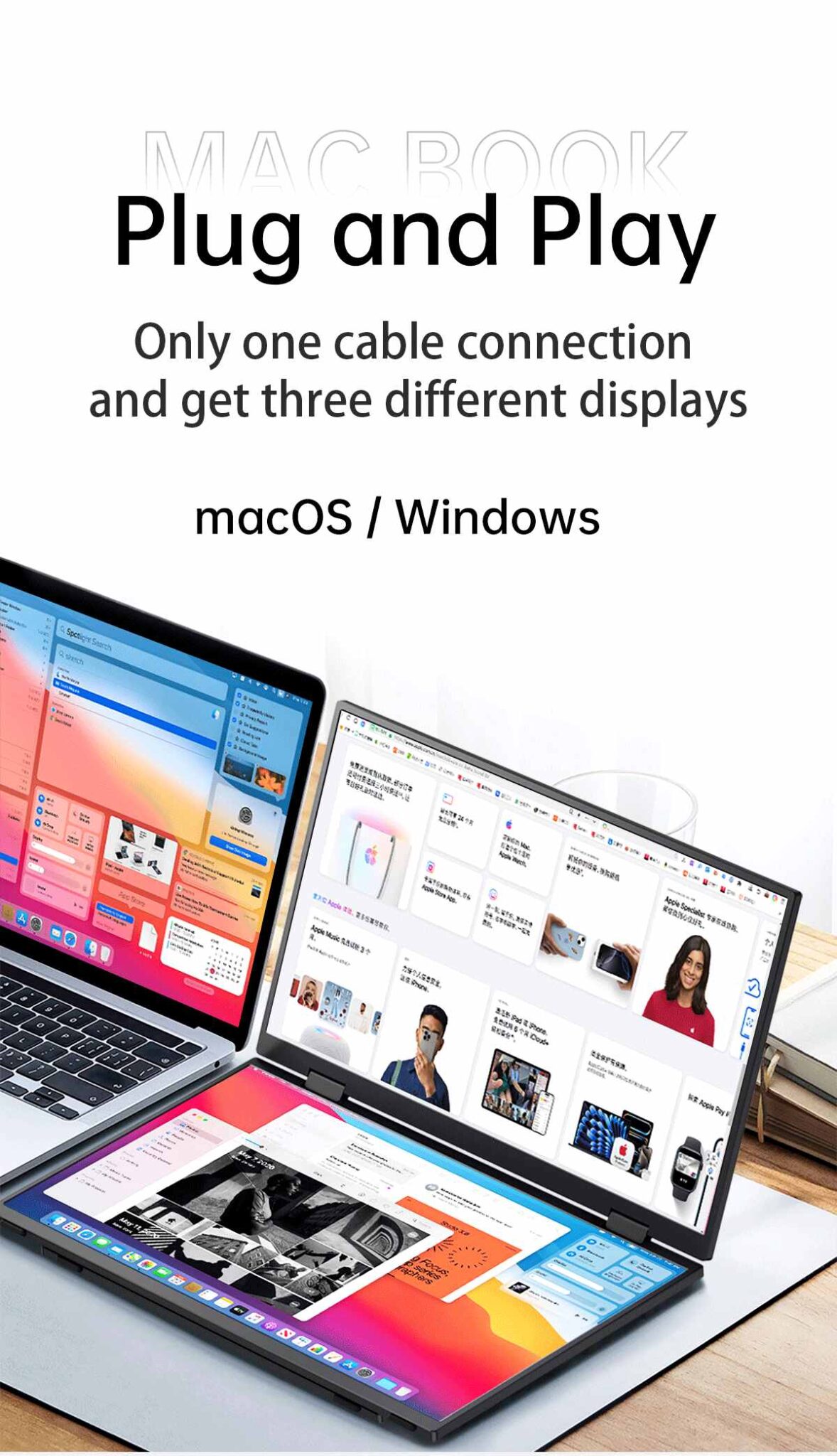
- MacBook triple-screen extension support
Dual Monitor Setup Travel for Business and Remote Work
A portable dual-screen monitor becomes particularly useful when you need to handle several applications simultaneously.
For example, during a business trip, you can keep your email or video meeting on one screen while using the second display for documents, spreadsheets, or presentations. For coding, you can place your development environment on one display and documentation or testing tools on the other.
Common Travel Use Cases
Business travel: Work from hotel rooms, temporary offices, and meeting spaces without changing your workflow.
Remote work: Keep communication tools on one display while using the other for your main task.
Coding: Display code on one screen and documentation, terminals, or browser windows on the second.
Design and editing: Use the expanded workspace with the IPS panel and 100% sRGB color gamut.
Presentations: Switch between extended, mirrored, and independent display modes depending on your meeting requirements.
15.6 Inch Portable Monitor vs. Traditional Travel Setup
Choosing the right display depends on how much portability and workspace flexibility you need.
| Feature | Dual-Screen Portable Monitor | Two Separate Monitors |
|---|---|---|
| Screen configuration | 2 × 15.6-inch | Usually two separate displays |
| Portability | Foldable integrated design | Requires separate carrying |
| Resolution | 1920 × 1080 × 2 | Depends on monitors |
| Workspace | Extended dual-screen setup | Extended dual-screen setup |
| Travel convenience | High | Lower |
| Setup flexibility | Foldable and rotatable | Requires individual positioning |
| MacBook workflow | Supports triple-screen extension | Depends on hardware and connections |
| Touch option | 10-point capacitive touch | Depends on model |
This makes a foldable dual monitor for laptop travel worth considering when you want additional workspace but do not want to transport two independent displays.
How to Build Your Dual Monitor Setup for Business Travel
You can establish a mobile workstation in a few straightforward steps:
- Place the portable monitor beside or behind your laptop. Adjust the folding angle according to your workspace.
- Connect the display using the supported USB connection. The single-cable design helps reduce cable clutter.
- Configure your display mode. Choose extended, mirrored, or independent screens according to your task.
- Arrange applications by workflow. Keep your primary task on one screen and reference materials or communication tools on the other.
- Adjust the viewing angle and brightness. Position both screens comfortably before starting extended work sessions.
This setup works particularly well when you frequently switch between different work locations.
Portable Monitor for MacBook and Creative Work
If you use a MacBook, the product supports triple-screen extension, allowing you to create a larger multi-display workspace. This can be useful when you need your laptop screen plus two additional displays.
The 100% sRGB color gamut also gives you a practical advantage for creative workflows. You can use one screen for your editing timeline or design canvas while keeping reference images, project files, or browser windows visible on another.
The optional 10-point capacitive touch function further supports interactive applications, presentations, browsing, and creative tasks where touch input is useful.
Why Consider Weichensi Technology?
Shenzhen Weichensi Technology Co., Ltd. has 9 years of experience in portable, medical, and industrial display development and manufacturing. Its product range includes portable monitors, medical monitors, industrial monitors, industrial all-in-one machines, Android all-in-one PCs, and advertising all-in-one machines.
For E-E-A-T evaluation, the company states that it maintains a complete production system covering product design, solution development, manufacturing, and assembly. It also reports 20+ product certifications, 10+ authorized patents, and 100+ global partners, alongside strict quality-control processes.
These capabilities are relevant when you are evaluating a 15.6 inch dual screen portable monitor for ongoing commercial, professional, or OEM-related requirements.
FAQ
Can I use a dual-screen portable monitor for business travel?
Yes. Its foldable structure and integrated dual-screen design make it suitable for hotel rooms, temporary offices, business meetings, and other mobile work environments.
Does this portable monitor work with MacBook?
The product supports MacBook triple-screen extension, allowing you to use the laptop display together with the two portable monitor screens for a larger workspace.
Is the monitor suitable for creative work?
Yes. The dual 15.6-inch IPS displays provide Full HD resolution and 100% sRGB color coverage. The optional 10-point capacitive touch function can also support interactive creative applications.
Conclusion
A Dual Monitor Setup Travel solution gives you a practical way to expand your workspace while moving between offices, hotels, meetings, and other locations. With two 15.6-inch Full HD IPS displays, 100% sRGB, flexible folding, optional 10-point touch, and MacBook triple-screen support, the Weichensi portable monitor can support business, coding, design, remote work, and presentation scenarios.
CTA
If you are evaluating a 15.6-inch dual-screen portable monitor for business use, bulk purchasing, customization, or OEM projects, contact Shenzhen Weichensi Technology Share your target device, connection requirements, quantity, and application scenario to discuss a suitable display configuration.

Add comment