


A standard portable monitor may provide extra screen space, but it does not always deliver the color accuracy, contrast, and detail required for demanding visual work. If you edit photographs, review high-resolution images, or need a sharper second screen while traveling, a 4K OLED Portable Monitor offers a combination of UHD resolution, self-emissive pixels, and wide color coverage in a compact display.
Shenzhen Weichensi Technology Co., Ltd. develops display terminal devices for professional and commercial applications, including portable monitors, medical monitors, and industrial displays. Its OLED portable display uses a Samsung OLED panel and supports 3840 × 2160 resolution, 100% DCI-P3 color gamut, and a 100,000:1 contrast ratio. Understanding these specifications helps you determine whether this display suits your workflow, connectivity requirements, and portability needs.
What Makes a 4K OLED Portable Monitor Different?
A 4K OLED portable monitor combines high pixel resolution with OLED panel technology. Unlike LCD panels that rely on a separate backlight, OLED pixels emit their own light, allowing individual pixels to switch off when displaying black.
This design creates several practical advantages:
- 4K UHD resolution: The 3840 × 2160 resolution provides detailed images for photography, design previews, and high-resolution media.
- High contrast: The specified 100,000:1 contrast ratio supports clear separation between dark and bright image areas.
- Wide color gamut: 100% DCI-P3 coverage supports workflows that require a broad range of colors.
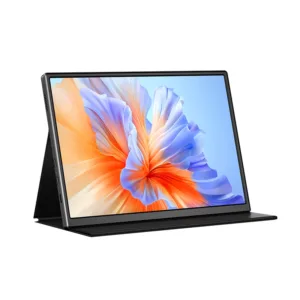
- Portable design: A slim, lightweight form makes it easier to add a second display to a mobile workstation.
- Optional touch control: The optional 10-point capacitive touchscreen supports direct interaction when the selected model includes this feature.
These specifications are particularly relevant when image detail and color presentation matter more than high refresh rates.
Key Specifications of the Weichensi OLED Portable Monitor
Before choosing a 4K OLED monitor for your laptop, compare its display specifications with your software, devices, and working environment.
| Specification | Product Information |
|---|---|
| Panel type | Samsung OLED panel |
| Resolution | 3840 × 2160 (4K UHD) |
| Screen size | Model-dependent, typically 13.3–15.6 inches |
| Color gamut | 100% DCI-P3 |
| Contrast ratio | 100,000:1 |
| Brightness | 400 nits |
| Refresh rate | 60Hz |
| Viewing angle | 178° |
| Aspect ratio | 16:9 |
| Touch function | Optional 10-point capacitive touch |
| Connectivity | USB-C with DP Alt Mode, HDMI |
The screen size and touchscreen availability depend on the specific model. Confirm the exact configuration with the supplier before placing an order.
The 400-nit brightness rating provides a useful reference for indoor offices, studios, and many mobile work environments. However, actual visibility depends on ambient light, screen reflections, and panel configuration, so you should not assume that the display is suitable for every direct-sunlight condition.
Practical Applications of a 4K OLED Portable Display
Photo Editing and Graphic Design
If you work with photographs, digital artwork, or visual layouts, a portable 4K OLED display gives you additional workspace without requiring a full-size desktop monitor. Its 100% DCI-P3 color gamut can support wide-gamut workflows, although accurate color reproduction also depends on calibration, software settings, and the color profile of your source files.
Video Production and Media Review
Video editors can use the display as a secondary screen for timelines, preview windows, and footage review. The 4K resolution helps you inspect fine image details, while OLED contrast makes dark scenes easier to distinguish under suitable viewing conditions.
Because the refresh rate is 60Hz, this model is more directly suited to productivity and visual-content workflows than applications that specifically require 120Hz or 144Hz output.
Mobile Office and Travel
For business travelers, consultants, and remote workers, an external monitor for a laptop can reduce the need to switch repeatedly between documents, spreadsheets, and communication tools. USB-C with DisplayPort Alt Mode can carry video from compatible devices, while HDMI offers another connection option.
Check your laptop or mobile device’s video-output support, cable requirements, and power arrangement before purchasing. USB-C availability alone does not guarantee video output from every device.

4K OLED vs. Other Portable Monitor Types
Choosing the right portable display requires more than comparing resolution alone. Consider how each panel type aligns with your budget, workflow, and performance priorities.
| Feature | 4K OLED Portable Monitor | 4K IPS Portable Monitor | 1080p Portable Monitor |
|---|---|---|---|
| Resolution | 3840 × 2160 | 3840 × 2160 | 1920 × 1080 |
| Contrast | Very high; specified at 100,000:1 for this product | Generally lower than OLED | Depends on panel type |
| Color coverage | 100% DCI-P3 for this product | Model-dependent | Model-dependent |
| Black levels | Individual pixels can switch off | Backlight remains active | Depends on panel type |
| Typical priority | Contrast and visual detail | Balanced viewing and productivity | Basic extended-screen use |
| Refresh rate | 60Hz for this product | Model-dependent | Model-dependent |
OLED is worth considering when contrast and wide color coverage are important. An IPS or 1080p display may be more appropriate when price, everyday office tasks, or lower system requirements take priority.
How to Choose the Right 4K OLED Portable Monitor
Follow these steps to evaluate whether the display fits your requirements.
- Define your main use case. Identify whether you need the screen for photo editing, video production, office work, or entertainment.
- Confirm the display configuration. Check the available screen size, touchscreen option, brightness, and exact panel specifications.
- Check device compatibility. Verify USB-C DisplayPort Alt Mode or HDMI support on your laptop, tablet, or other source device.
- Evaluate color requirements. If your workflow depends on color accuracy, ask about calibration procedures, supported color profiles, and color-management options.
- Review physical requirements. Confirm dimensions, weight, stand arrangements, protective accessories, and power needs for travel or desk use.
- Request product documentation. Ask the supplier for the model-specific datasheet, warranty terms, and applicable product compliance documents before ordering.
This process helps you compare products based on measurable requirements instead of relying on general marketing descriptions.
Why Consider Weichensi for Display Solutions?
Shenzhen Weichensi Technology Co., Ltd. has nine years of industry experience in display terminal research, development, and production. Its product portfolio includes portable monitors, medical monitors, industrial monitors, industrial all-in-one computers, Android all-in-one computers, and advertising all-in-one machines.
The company reports more than 20 product certifications, over 10 authorized patents, and more than 100 global partners. These figures provide useful company-level background, but buyers should verify which certifications and patents apply to the specific product they intend to purchase.
Weichensi also describes a production system covering product design, solution development, manufacturing, assembly, and quality control. For business procurement, request relevant inspection records, technical documentation, and compliance certificates to assess whether a particular model meets your project requirements.
FAQ
1. Is a 4K OLED portable monitor suitable for photo editing?
Yes, it can be suitable for photo editing because 4K resolution provides detailed images and 100% DCI-P3 coverage supports a wide color gamut. For color-critical work, confirm calibration performance and software compatibility.
2. Can I connect this OLED portable monitor to a laptop using USB-C?
Yes, if your laptop’s USB-C port supports DisplayPort Alt Mode. HDMI is another listed connection option. Confirm the required cable and power arrangement for your specific device.
3. Does the Weichensi OLED portable monitor support touchscreen operation?
The product specification lists an optional 10-point capacitive touchscreen. Touch functionality is therefore configuration-dependent, so confirm availability for your chosen model before ordering.
Conclusion
A 4K OLED Portable Monitor can provide detailed images, deep blacks, wide color coverage, and additional workspace for creative professionals and mobile users. The Weichensi OLED portable display specifies 3840 × 2160 resolution, 100% DCI-P3 color coverage, a 100,000:1 contrast ratio, 400-nit brightness, and 60Hz refresh rate. Before choosing a model, verify its size, optional touch function, device compatibility, and color-calibration requirements against your actual workflow.
Contact Shenzhen Weichensi Technology to request the model-specific datasheet, confirm available configurations, and discuss your portable display requirements for professional or commercial applications.


Add comment