


Choosing an Android All-in-One PC for industrial applications requires more than checking screen size and processor speed. Your equipment must handle dust, vibration, electromagnetic interference, and long operating hours without frequent maintenance. A standard commercial computer may struggle in production lines, factory workshops, or electrical substations where environmental conditions can affect performance.
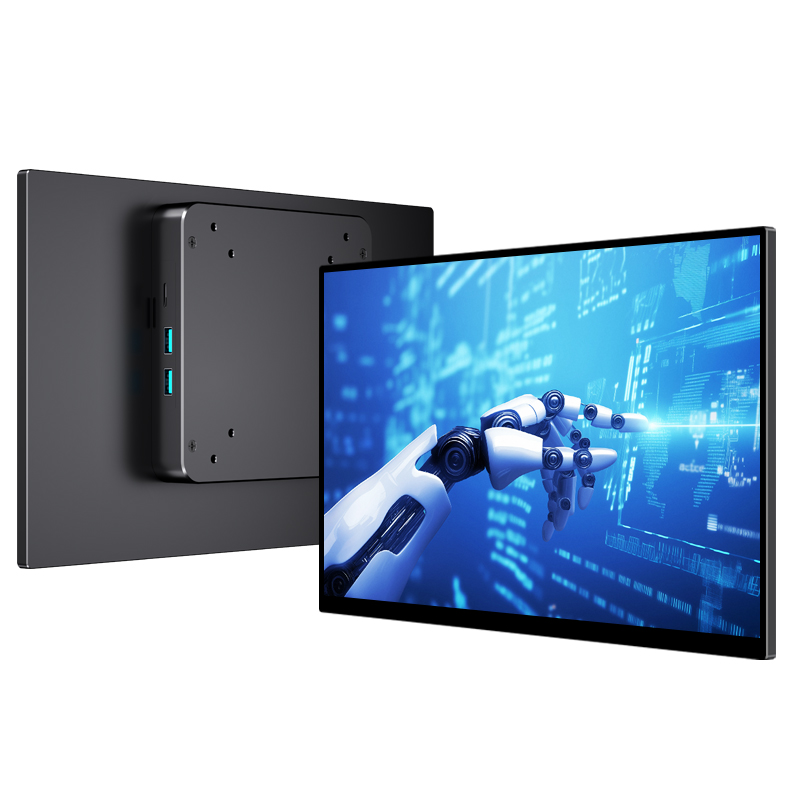
The 13.3-inch Android industrial computer from Shenzhen Weichensi Technology Co., Ltd. addresses these challenges with an aluminum alloy enclosure, IP45 protection, fanless cooling, and an Android 14 operating system. Its Full HD touchscreen and customizable hardware configuration make it suitable for industrial control, equipment monitoring, and interactive applications. This guide explains its specifications, practical advantages, and key considerations when selecting an industrial Android computer.
What Makes This Android All-in-One PC Suitable for Industrial Use?
An industrial Android All-in-One PC integrates computing hardware, an operating system, and a display into one compact unit. Unlike conventional desktop computers, industrial models prioritize environmental protection, stable operation, and integration with existing equipment.
The 13.3-inch model combines several features designed for demanding working environments:
- Aluminum alloy enclosure: Provides a durable housing for industrial installations.
- IP45 protection: Helps protect the unit against dust ingress and water jets from different directions under specified test conditions.
- Fanless cooling: Eliminates moving cooling fans, reducing noise and the risk of dust entering through fan openings.
- Vibration resistance: Supports stable operation in environments with equipment movement and mechanical vibration.
- EMI resistance: Helps maintain reliable operation in environments with electromagnetic interference.
- 10-point capacitive touch: Supports responsive multi-touch interaction for monitoring and equipment control.
These features make the computer a practical option when you need an integrated display and computing platform rather than a separate monitor and desktop system.
Key Specifications of the 13.3-Inch Android Industrial PC
Hardware specifications directly affect application compatibility, responsiveness, and installation requirements. Before choosing an industrial Android computer, you should evaluate its processing platform, memory, display, and power input together.
| Specification | Product Details |
|---|---|
| Screen Size | 13.3 inches |
| CPU | 4× Cortex-A76 + 4× Cortex-A558 cores, 2.4 GHz (as listed) |
| Memory | LPDDR4, 8GB standard; 4GB/8GB/16GB options |
| Operating System | Google Android 14 |
| Graphics | Mali-G610 |
| Resolution | 1920 × 1080 Full HD |
| Brightness | 400 nits |
| Contrast Ratio | 1200:1 |
| Touchscreen | 10-point capacitive touch |
| Power Input | DC 12V, 3A |
| Protection | IP45 |
Processing Performance and Android 14
The listed eight-core processor configuration combines Cortex-A76 and Cortex-A558 cores, with a maximum listed frequency of 2.4 GHz. Together with the Mali-G610 graphics processor, the platform supports Android-based applications involving data visualization, touch interaction, and equipment interfaces.
Android 14 provides the operating system foundation for compatible applications. You can evaluate the available memory configurations according to your software requirements, especially if your application needs to run multiple processes or display detailed monitoring information.
Full HD Display and Touch Interaction
The 1920 × 1080 resolution provides a clear viewing area for industrial dashboards, operating instructions, and equipment status information. Meanwhile, 400-nit brightness and a 1200:1 contrast ratio support screen visibility in different indoor working environments.
The 10-point capacitive touchscreen allows operators to interact directly with application interfaces. This is useful when workers need to adjust parameters, navigate menus, or review production data without using an external keyboard and mouse.
Fanless Cooling and IP45 Protection for Continuous Operation
Industrial environments expose electronic equipment to conditions that ordinary office computers may not encounter. Dust accumulation, accidental liquid exposure, vibration, and electromagnetic interference can all affect equipment reliability.
This Android All-in-One PC uses a fanless cooling structure to reduce mechanical wear and prevent dust from entering through conventional fan openings. The manufacturer states that this design can reduce energy consumption by approximately 30%.
Its IP45-rated protection provides defined resistance against dust ingress and water jets. However, IP45 does not mean the computer is waterproof or suitable for immersion.
Another important specification is the backplane’s stated average lifespan of more than 50,000 hours. This figure relates to the backplane rather than guaranteeing the operating lifespan of the complete computer. The design supports applications requiring continuous 24/7 operation, subject to suitable installation and operating conditions.
Typical Applications of an Industrial Android All-in-One PC
A compact 13.3-inch touchscreen computer can serve different purposes depending on your software, mounting requirements, and equipment interfaces.
Common application scenarios include:
- Factory production lines: Display production status, operating instructions, and equipment information.
- Industrial control systems: Provide touchscreen access to compatible monitoring and control applications.
- Electrical substations: Support equipment status displays and operational information interfaces.
- Industrial equipment integration: Serve as an embedded computing and display terminal within machinery.
- Data monitoring stations: Present real-time data through compatible Android applications.
For example, a factory operator can use the touchscreen to review production information and access equipment controls from a single terminal. This integrated setup can simplify the workstation layout and reduce the need for separate display and computing devices.
Industrial Android All-in-One PC vs. Standard Commercial Computer
Not every Android computer is suitable for industrial environments. Comparing the main design differences helps you identify which solution better matches your installation requirements.
| Comparison Factor | Industrial Android PC | Standard Commercial PC |
|---|---|---|
| Enclosure | Industrial-grade housing | General-purpose housing |
| Environmental Protection | IP-rated protection available | Depends on model |
| Cooling | Fanless options available | Often uses active cooling |
| Vibration Resistance | Designed for industrial conditions | Generally less specialized |
| Operating System | Android or other supported platforms | Varies by product |
| Installation | Industrial mounting options | Office-oriented installation |
| Typical Applications | Factory control and monitoring | Office and general computing |
If your application involves dust, vibration, or extended operating hours, an industrial model offers more relevant design features. However, you should still check the required operating temperature, mounting method, connectivity, and environmental ratings before purchasing.
How to Select the Right Android All-in-One PC
Selecting the correct configuration involves more than comparing prices. Follow these steps to reduce compatibility issues during deployment.
- Define your application: Identify whether you need equipment control, data monitoring, production management, or an interactive terminal.
- Check processing requirements: Confirm that the processor and Android version support your intended applications.
- Choose suitable memory: Compare 4GB, 8GB, and 16GB configurations based on application resource requirements.
- Evaluate environmental conditions: Check IP protection, vibration resistance, EMI performance, and cooling requirements.
- Confirm installation and interfaces: Discuss mounting methods, interface expansion, and hardware integration with your supplier.
- Verify continuous operation requirements: Confirm operating conditions and system compatibility before deploying the computer for 24/7 use.
Why Choose Shenzhen Weichensi Technology?
Shenzhen Weichensi Technology Co., Ltd. specializes in display terminal devices, including portable monitors, medical monitors, industrial monitors, and Android All-in-One PCs.
With 9 years of industry experience, the company focuses on product development, manufacturing, and customized display solutions. Its production system covers product design, solution development, manufacturing, and assembly.
Its company capabilities include:
- 20+ product certifications: Supporting product compliance and quality requirements across different markets.
- 10+ authorized patents: Reflecting investment in product development and technical innovation.
- 100+ global partners: Demonstrating experience serving customers in international markets.
- Modern production facilities: Supporting component processing, assembly, and product testing.
- Customization services: Options for interface expansion, installation methods, hardware configurations, and system platforms.
When sourcing an industrial Android computer, you can discuss your application requirements directly with the manufacturer to determine whether the available configuration meets your project specifications.
FAQ
Q1: Does this Android All-in-One PC support continuous 24/7 operation?
The product is designed to meet continuous 24/7 operating requirements. Its fanless cooling structure and industrial enclosure support long-term operation, although actual performance depends on installation and environmental conditions.
Q2: Can I customize the memory and hardware configuration?
Yes. The listed memory options include 4GB, 8GB, and 16GB LPDDR4. Weichensi also supports customization options involving interface expansion, installation methods, and system platforms. Confirm configuration availability with the manufacturer before ordering.
Q3: Is an IP45-rated industrial Android computer waterproof?
No. IP45 provides protection against limited dust ingress and water jets, but it does not indicate protection against immersion. If your installation involves direct washing, heavy water exposure, or outdoor conditions, discuss the required protection rating with the supplier.
Conclusion
Choosing the right Android All-in-One PC can improve equipment interaction, simplify workstation integration, and support reliable operation in demanding industrial environments. The 13.3-inch model from Shenzhen Weichensi Technology combines Android 14, Full HD resolution, 10-point capacitive touch, IP45 protection, and fanless cooling in an integrated industrial computer.
If you are sourcing an industrial Android computer for factory automation, equipment monitoring, or customized control terminals, contact Shenzhen Weichensi Technology. Share your application requirements, preferred memory configuration, installation method, and interface specifications to request a suitable product configuration and discuss your OEM/ODM project requirements.



Add comment